欢迎来到 Rust for Linux Insides!
Rust for Linux Insides 是华中科技大学开放原子开源俱乐部发起的技术文档项目,聚焦 Rust 语言与 Linux 的深度结合,旨在通过系列技术博客、代码示例、原理解析,帮助开发者理解 Rust for Linux 内部机制,并掌握用 Rust 开发 Linux 内核驱动、优化 Linux 内核模块的方法。
无论是 Linux 内核初学者、Rust 技术实践者,还是开源爱好者,都能从本项目中获取 Rust for Linux 底层原理的清晰解读与 Rust 落地实践的参考案例。
在本项目中,你可以查阅如下三个模块分别获得对应的帮助:
-
- 旨在帮助读者能够更快上手 Rust for Linux 开发,对 Rust for Linux 的源码进行详细解释
-
- 本项目会接收任何爱好者投递的博客 (通过 Pull Request) 的方式,在通过评审后会合并到主线中
-
- 旨在跟踪上游 Rust for Linux 社区的开发路线,并且会对一些功能性 PATCH 或 讨论进行解读
-
参考链接
Rust for Linux Wiki
本项目的 Wiki 主要聚焦 Rust for Linux 的代码实现,并介绍各模块功能,该 Wiki 会随着版本实时更新。
在开始之前,需要准备一个可运行 Rust for Linux 的环境。下文先说明笔者当前的系统环境:
OS: Fedora 42 (Server Edition)
Gcc: gcc version 15.2.1 20251022 (Red Hat 15.2.1-3) (GCC)
Clang: clang version 20.1.8 (Fedora 20.1.8-4.fc42)
Rust: rustc 1.91.0 (f8297e351 2025-10-28)
LLVM: LLVM version 20.1.8
LLD: LLD 20.1.8 (compatible with GNU linkers)
Rust for Linux 环境搭建
我们将通过编译内核并使用 QEMU 启动编译产物来搭建运行环境。为了简化流程,除 QEMU 与编译的内核外,rootfs 与 disk image 等均采用预先准备好的在线镜像。
安装 Rust
在 Rust for Linux 的官方文档中,推荐使用发行版的包管理器安装;本文改用 Rust 官方安装脚本。只需确保 rustc 版本 ≥ 1.80 即可。
因此这里仅给出使用 Rust 官方脚本的安装方式:
对于国内用户,可以采用 rsproxy 更换镜像源后进行安装
curl --proto '=https' --tlsv1.2 -sSf https://rsproxy.cn/rustup-init.sh | sh
安装完成后,检查版本确保 rustc 版本 ≥ 1.80。
rustc --version
rustc 1.91.0 (f8297e351 2025-10-28)
当然,你可以通过如下代码进行简单验证:
fn main() {
    println!("Hello Rust Version Done! Version: {:?}", std::env::var("CARGO_PKG_VERSION"))
}
通过官方安装脚本安装时,通常也会安装 rustfmt 和 rust-clippy。可通过以下命令验证是否安装成功:
rustfmt --version
rustfmt 1.8.0-stable (f8297e351a 2025-10-28)

cargo clippy --version
clippy 0.1.91 (f8297e351a 2025-10-28)
如若没有安装,请通过如下指令进行安装:
rustup component add rust-src rustfmt clippy
进行 Rust for Linux 开发还需安装 bindgen,用于从 C 头文件生成 Rust FFI 绑定。
cargo install --locked bindgen-cli
安装 QEMU
后续将通过 QEMU 启动镜像,因此需要先安装 QEMU。
对于 QEMU 的安装而言,通常分为两种方式:包管理安装和手动编译。笔者通常喜欢手动编译,但下方会给出两种安装方式,读者可以自行选择其中一种进行安装。
包管理安装
包管理安装可以直接通过各自的系统命令进行安装,下方给出两种常见发行版本安装命令:
- Ubuntu/Debian(全量安装)
sudo apt install qemu -y
- Ubuntu/Debian(精简安装)
sudo apt install qemu-system-x86 -y
- Fedora/Rocky(全量安装)
sudo dnf install qemu -y
- Fedora/Rocky(精简安装)
sudo dnf install qemu-system-x86 -y
源码编译安装
这里简单阐述一下为什么选择源码编译,因为源码编译可以自行选择安装版本,避免版本过久问题。
首先安装所需的依赖包:
sudo dnf in ninja-build python3-sphinx python3-sphinx_rtd_theme glib2-devel libslirp-devel -y
然后下载对应的源码并解压:
wget https://download.qemu.org/qemu-10.1.2.tar.xz
tar Jxvf qemu-10.1.2.tar.xz
进入对应的目录进行配置:
./configure --prefix=/opt/qemu --enable-kvm --enable-debug
make -j$(nproc)
精简安装:本教程主要在
x86环境上进行操作,因此如果读者的资源有限或认为全量编译过慢,可以通过下方指令进行精简编译./configure --prefix=/opt/qemu --target-list=x86_64-softmmu --enable-kvm
编译完成后,安装到指定目录,并配置环境变量;然后进行验证:
sudo make install
echo "export PATH=$PATH:/opt/qemu/bin" >> $HOME/.bashrc
source $HOME/.bashrc

qemu-system-x86_64 --version
QEMU emulator version 10.1.2
Copyright (c) 2003-2025 Fabrice Bellard and the QEMU Project developers
构建 Linux 内核(vmlinux)
提前准备好 Linux 编译所需要的依赖包:
sudo dnf in gcc clang clang-tools-extra llvm lld gpg2 git gzip make openssl perl rsync binutils ncurses-devel flex bison openssl-devel elfutils-libelf-devel rpm-build
准备好 Rust 环境后,我们将通过编译内核源码生成内核产物(vmlinux)。
首先,我们直接克隆 Rust for Linux 主线分支 (Linux 内核主线源码也是可行的,只是相较于 Rust for Linux 主线分支支持的特性稍微少一些)。
git clone https://github.com/Rust-for-Linux/linux.git rust-for-linux --depth=1
进入到 rust-for-linux 目录中 (这里将 Rust for Linux 主线代码重命名为 rust-for-linux 这是为了避免与 linux 内核主线重名)。然后通过如下命令检查 Rust 依赖和版本是否正确。
需要特别注意:编译 Rust for Linux 要求 LLVM 工具链版本 ≥ 15.0.0
make LLVM=1 rustavailable
Rust is available!
只有输出结果为 Rust is available! 时,才证明当前主机环境能够正常通过 Rust 编译内核。现在,我们就可以开始编译 Rust for Linux 的内核源码。
make LLVM=1 defconfig
make LLVM=1 menuconfig
首先通过 defconfig 生成默认配置,然后使用 menuconfig 启用 RUST 和 SAMPLES_RUST,参数位置如下:
config RUST
Location:
  -> General setup
    -> Rust support (RUST [=y])

config SAMPLES_RUST
Location:
  -> Kernel hacking
    -> Sample kernel code (SAMPLES [=y])
      -> Rust samples (SAMPLES_RUST [=y])
配置完成后,就能够正常启用 Rust 进行编译内核,然后开始编译。
make LLVM=1 -j$(nproc)
在编译时,可以通过编译的日志查看到一些 Rust 编译信息:
  RUSTC L rust/core.o
  BINDGEN rust/bindings/bindings_generated.rs
  BINDGEN rust/bindings/bindings_helpers_generated.rs
  CC      rust/helpers/helpers.o
  RUSTC P rust/libpin_init_internal.so
  RUSTC P rust/libmacros.so
对于 Rust 是必须开启
LLVM=1选项的,因此不能够省略,如果想要省略,可以在编译配置前使用如下命令:export LLVM=1
编译完成后,可以在源码目录中看到生成的内核产物。其中:
vmlinux是未压缩的 ELF 内核文件,包含完整符号信息,主要用于调试与分析;
下文在 QEMU 启动场景中以 vmlinux 作为内核镜像进行说明。
运行 Rust for Linux 镜像
之前提到,为了简化流程,我们会直接从网络上下载已有镜像进行运行,因此需要运行如下命令:
wget https://cdimage.debian.org/images/cloud/bookworm/20250316-2053/debian-12-nocloud-amd64-20250316-2053.qcow2 -O debian-12.qcow2
如果想要下载其他架构,请参考最下方的参考链接中的 Rust Exercises Ferrous System
为了简化下载的方便,所下载的镜像的大小不会太大,因此内部的空间不足以让我们后续替换内核镜像和加载内核模块。所以在启动之前需要进行扩容,启动后在内部修改磁盘大小以支持镜像更换。
(host-machine) qemu-img resize debian-12.qcow2 +32G
至此,前期的准备工作均准备完毕,运行以下命令启动虚拟机:
(host-machine) qemu-system-x86_64 -m 8G -M q35 -accel kvm -smp 8 \
  -hda debian-12.qcow2 \
  -device e1000,netdev=net0 \
  -netdev user,id=net0,hostfwd=tcp:127.0.0.1:5555-:22 \
  -nographic \
  -serial telnet:localhost:4321,server,wait
此时,该终端会一直挂起,读者需要另起一个新终端,通过 telnet 命令进行连接:
telnet localhost 4321
[  OK  ] Finished systemd-user-sess…ervice - Permit User Sessions.
[  OK  ] Started getty@tty1.service - Getty on tty1.
[  OK  ] Started serial-getty@ttyS0…rvice - Serial Getty on ttyS0.
[  OK  ] Reached target getty.target - Login Prompts.
[  OK  ] Started dbus.service - D-Bus System Message Bus.
[  OK  ] Started systemd-logind.service - User Login Management.
[  OK  ] Started unattended-upgrade…0m - Unattended Upgrades Shutdown.
[  OK  ] Finished e2scrub_reap.serv…ine ext4 Metadata Check Snapshots.
[  OK  ] Reached target multi-user.target - Multi-User System.
[  OK  ] Reached target graphical.target - Graphical Interface.
         Starting systemd-update-ut… Record Runlevel Change in UTMP...
[  OK  ] Finished systemd-update-ut… - Record Runlevel Change in UTMP.

Debian GNU/Linux 12 localhost ttyS0

localhost login:
此时,就启动了对应的内核镜像,通过 root 用户登录 (无密码)。当前启动的内核是自带内核,因此需要更换内核镜像。在这之前,我们还需要进行扩容操作,并且需要配置好 ssh 以方便将内核镜像传入到虚拟机中。
(virt-machine) uname -a
Linux localhost 6.1.0-32-amd64 #1 SMP PREEMPT_DYNAMIC Debian 6.1.129-1 (2025-03-06) x86_64 GNU/Linux

(virt-machine) apt update
(virt-machine) apt install fdisk
(virt-machine) cfdisk /dev/*da
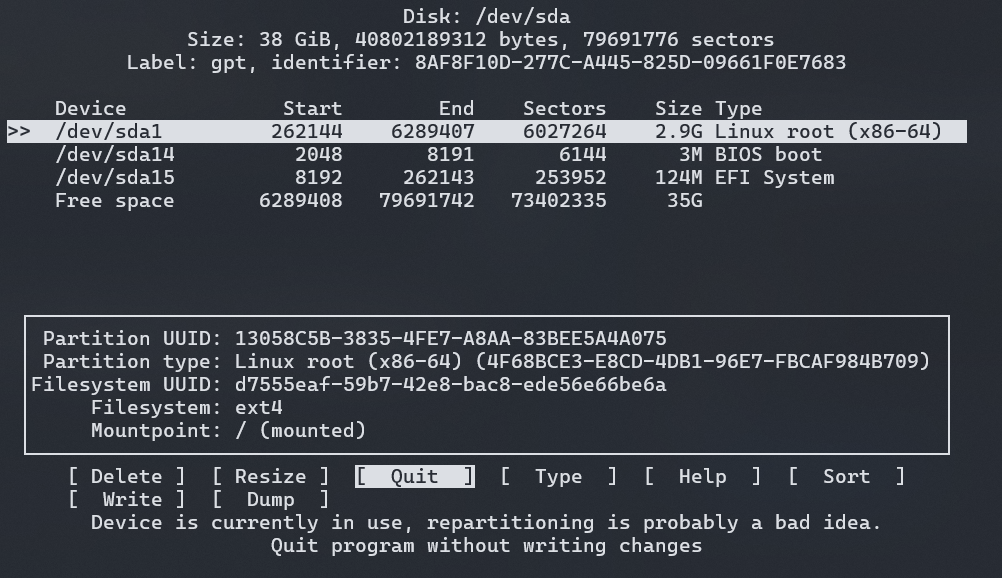
执行上述命令后,可以看到如上所示的界面。首先选择 Sort,此时你会发现 Linux root 往下移动,与 Free space 近邻,然后如下所示,选择 Linux root 对应的磁盘,并且选择 Resize 选项。
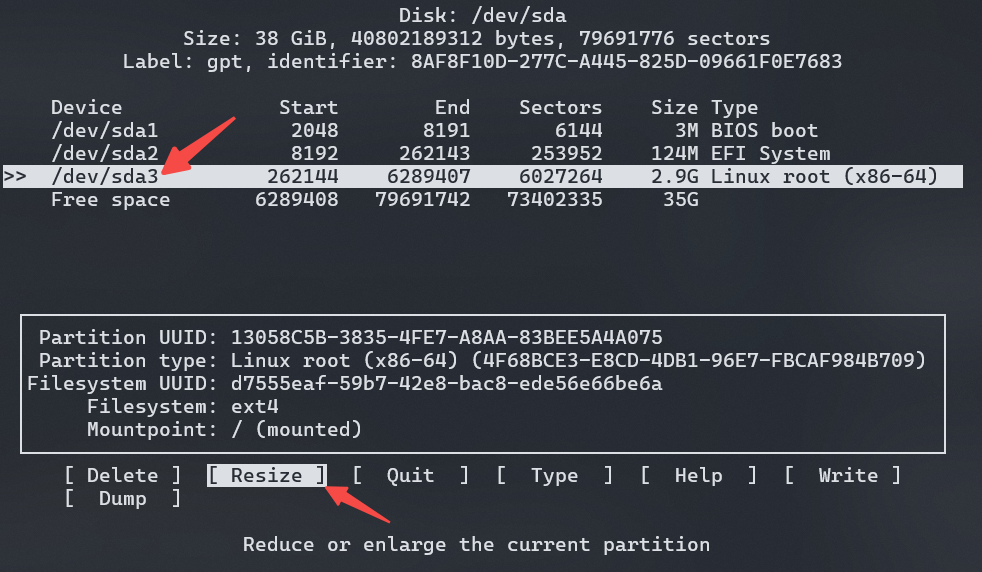
然后键入两次回车,发现 Linux root 的大小更改后,选择 Write 选项,然后键入 yes 确定修改,如下所示:
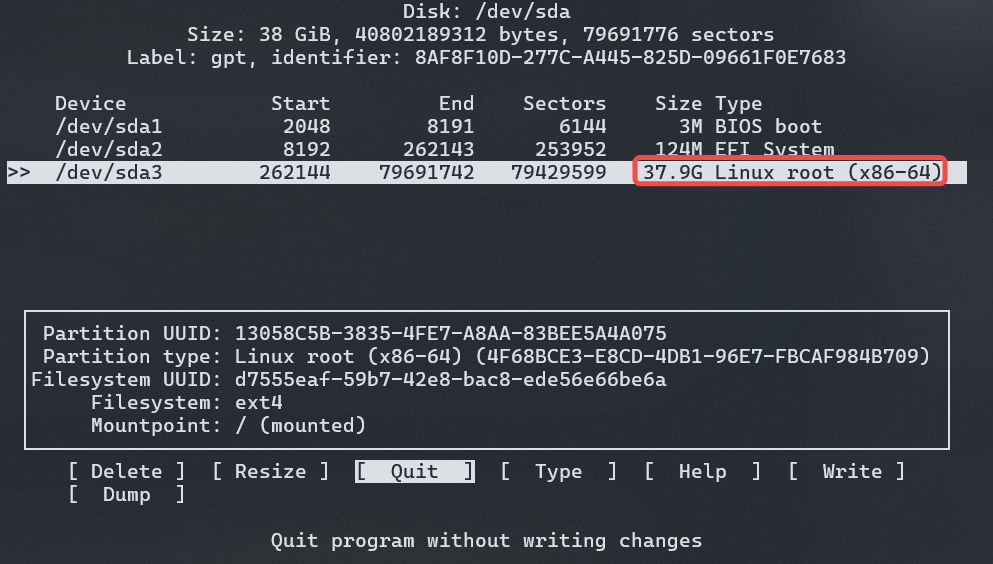
至此,选择 Quit 选项即可,使用 reboot 重启虚拟机,查看是否更改成功:
(virt-machine) reboot

(virt-machine) df -h
Filesystem      Size  Used Avail Use% Mounted on
...
/dev/sda3        38G  1.2G   35G   4% /
...
修改完成后,接下来需要配置 ssh:
(virt-machine) apt install openssh-server
并将主机的 ssh 公钥复制到虚拟机中的 .ssh/authorized_keys 文件中。接着将上方我们编译的内核传入到虚拟机中:
(host-machine) scp -P 5555 rust-for-linux/vmlinux root@localhost:/root
此时,能够在虚拟机中发现对应的文件,将其添加可执行文件权限,并移动到 /boot 下
(virt-machine) chmod +x vmlinux
(virt-machine) cp /boot/vmlinuz-6.1.0-32-amd64 /boot/vmlinuz-6.1.0-32-amd64-bak
(virt-machine) cp vmlinux /boot/vmlinuz-6.1.0-32-amd64
(virt-machine) reboot
重启后,如无任何报错信息,则更换内核完毕,通过如下命令查看:
(virt-machine) uname -a
至此,启动一个 Rust for Linux 编译的内核镜像就成功完成了。
Tips:启用 rust-analyzer
Rust for Linux 提供了 make rust-analyzer 命令,便于启用 rust-analyzer 以更高效地编写和查看 Rust 代码。
通常我会按如下步骤启用 clangd 和 rust-analyzer,以同时支持内核 C 源码与 Rust 代码:
bear -- make LLVM=1 -j`nproc`
make LLVM=1 rust-analyzer
参考链接
内核进入许可证
上一章我们成功搭建了 Rust for Linux 的源码环境,现在我们将正式开始深入学习内核源码。在此之前,我们首先需要了解 Rust 在内核中的组织结构 (只包含目录):
rust
├── bindings/
├── helpers/
├── kernel/
├── macros/
├── pin-init/
├── proc-macro2/
├── quote/
├── syn/
└── uapi/
在这个结构中,rust/kernel 是 Rust 实现内核逻辑的主要目录。除 rust/kernel 之外的所有目录,都是 Rust for Linux 项目提供的外部支持模块,它们共同为内核代码的编写提供了必要的工具和抽象。例如,pin-init 是一个重要的辅助模块,由 Rust for Linux 上游直接维护(详见 pin-init)。
因此,在真正进入内核 rust/kernel 的学习之前,我们必须先掌握这些主要的外部支持模块。只有理解了这些“许可证”模块的功能和用法,我们才能在后续的源码学习中,准确而深入地理解代码的含义和设计思路。
这就是为什么将这个章节取名为:内核进入许可证。掌握这些基础模块,是深入内核源码的先决条件。
Bindings
在 Rust for Linux 项目的初期,首要也是最关键的任务是解决 Rust 代码如何安全、高效地调用现有 C 语言内核函数的问题。由于完全重写整个 Linux 内核是不切实际的,复用成熟的 C 语言代码库成为了必然的选择。
为了实现这一目标,rust-bindgen 提供了可行的、自动化的解决方案。bindgen 是一个强大的工具,它通过命令行直接将 C 语言的头文件 (Header Files) 转换为 Rust 的外部函数接口 (Foreign Function Interface, FFI) 绑定代码。
# rust/Makefile:444
quiet_cmd_bindgen = BINDGEN $@
      cmd_bindgen = \
	$(BINDGEN) $< $(bindgen_target_flags) --rust-target 1.68 \
		--use-core --with-derive-default --ctypes-prefix ffi --no-layout-tests \
		--no-debug '.*' --enable-function-attribute-detection \
		-o $@ -- $(bindgen_c_flags_final) -DMODULE \
		$(bindgen_target_cflags) $(bindgen_target_extra)
上面给出了 Rust 是如何使用 bindgen 来生成 Rust 外部函数接口绑定代码。在内核中,主要有三个地方会生成 FFI 代码,分别位于两个目录中:bindings/ 和 uapi/。
一些通用配置例如:--use-core 会让生成的绑定代码依赖 core 而非 std,以适配内核的 #![no_std] 环境。--ctypes-prefix ffi 则会为 C ABI 相关类型加上 ffi:: 前缀;在内核 Rust 代码中,ffi 模块通常由当前 crate 定义,用于集中管理并显式标注 FFI 边界(ffi 小节中有详细解释)。需要注意的是,该 ffi 映射不一定等同于 core::ffi,内核可能会根据自身约束(例如 -funsigned-char)对部分类型做定制。 …
$@ 则是目标产物文件,-- 分隔符后的内容是传递给 Clang 编译器的参数,用于解析 C 语言头文件内容。
# rust/Makefile:370
bindgen_skip_c_flags := -mno-fp-ret-in-387 -mpreferred-stack-boundary=% \
  -mskip-rax-setup ...

bindgen_extra_c_flags = -w --target=$(BINDGEN_TARGET)
ifeq ($(shell expr $(libclang_maj_ver) \< 16), 1)
bindgen_extra_c_flags += -enable-trivial-auto-var-init-zero-knowing-it-will-be-removed-from-clang
endif

# rust/Makefile:415
bindgen_c_flags = $(filter-out $(bindgen_skip_c_flags), $(c_flags)) \
	$(bindgen_extra_c_flags)
endif

ifdef CONFIG_LTO
bindgen_c_flags_lto = $(filter-out $(CC_FLAGS_LTO), $(bindgen_c_flags))
else
bindgen_c_flags_lto = $(bindgen_c_flags)
endif

# rust/Makefile:425
# `-fno-builtin` is passed to avoid `bindgen` from using `clang` builtin
# prototypes for functions like `memcpy` -- if this flag is not passed,
# `bindgen`-generated prototypes use `c_ulong` or `c_uint` depending on
# architecture instead of generating `usize`.
bindgen_c_flags_final = $(bindgen_c_flags_lto) -fno-builtin -D__BINDGEN__
bindgen_c_flags_final 保证了最终传递给 bindgen 的 C 编译环境是最小化、最纯净且完全针对 bindgen 生成而优化的,避免了不必要的架构优化细节来干扰 FFI 类型的正确映射。
首先 bindgen_skip_c_flags 列出了一组需要从标准内核编译标志中排除的 C 标志;通常来说,bindgen 理应支持 GNU GCC 后端,并且完全兼容 Clang 驱动生成;为了能够让 Clang 正常工作,因此跳过不必要的标志。
而后,bindgen_c_flags 会根据给出的 bindgen_skip_c_flags 从 c_flags 中剔除掉相应的标志,并且添加上 bindgen 额外需要的标志。如果内核开启了 LTO 优化,那么相关的 LTO 标志就必须被移除,使其最终获得一个不含 LTO 的标志集合。并且还需要禁止内联函数的生成,如下则是一个经过编译验证的 bindgen_c_flags_final 的完整内容,读者可选择性查看:
-Wp,-MMD,rust/bindings/.bindings_generated.rs.d -nostdinc -I./arch/x86/include -I./arch/x86/include/generated -I./include -I./include -I./arch/x86/include/uapi -I./arch/x86/include/generated/uapi -I./include/uapi -I./include/generated/uapi -include ./include/linux/compiler-version.h -include ./include/linux/kconfig.h -include ./include/linux/compiler_types.h -D__KERNEL__ --target=x86_64-linux-gnu -fintegrated-as -Werror=unknown-warning-option -Werror=ignored-optimization-argument -Werror=option-ignored -Werror=unused-command-line-argument -Werror -std=gnu11 -fshort-wchar -funsigned-char -fno-common -fno-PIE -fno-strict-aliasing -mno-sse -mno-mmx -mno-sse2 -mno-3dnow -mno-avx -mno-sse4a -fcf-protection=branch -fno-jump-tables -m64 -falign-loops=1 -mno-80387 -mno-fp-ret-in-387 -mstack-alignment=8 -mskip-rax-setup -march=x86-64 -mtune=generic -mno-red-zone -mcmodel=kernel -mstack-protector-guard-reg=gs -mstack-protector-guard-symbol=__ref_stack_chk_guard -Wno-sign-compare -fno-asynchronous-unwind-tables -mretpoline-external-thunk -mindirect-branch-cs-prefix -mfunction-return=thunk-extern -fpatchable-function-entry=16,16 -fno-delete-null-pointer-checks -O2 -fstack-protector-strong -fomit-frame-pointer -ftrivial-auto-var-init=zero -fno-stack-clash-protection -falign-functions=16 -fstrict-flex-arrays=3 -fms-extensions -fno-strict-overflow -fno-stack-check -fno-builtin-wcslen -Wall -Wextra -Wundef -Werror=implicit-function-declaration -Werror=implicit-int -Werror=return-type -Werror=strict-prototypes -Wno-format-security -Wno-trigraphs -Wno-frame-address -Wno-address-of-packed-member -Wmissing-declarations -Wmissing-prototypes -Wframe-larger-than=2048 -Wno-gnu -Wno-microsoft-anon-tag -Wno-format-overflow-non-kprintf -Wno-format-truncation-non-kprintf -Wno-pointer-sign -Wcast-function-type -Wimplicit-fallthrough -Werror=date-time -Werror=incompatible-pointer-types -Wenum-conversion -Wunused -Wno-unused-but-set-variable -Wno-unused-const-variable -Wno-format-overflow -Wno-override-init -Wno-pointer-to-enum-cast -Wno-tautological-constant-out-of-range-compare -Wno-unaligned-access -Wno-enum-compare-conditional -Wno-missing-field-initializers -Wno-type-limits -Wno-shift-negative-value -Wno-enum-enum-conversion -Wno-sign-compare -Wno-unused-parameter -DKBUILD_MODFILE='"rust/bindings_generated"' -DKBUILD_BASENAME='"bindings_generated"' -DKBUILD_MODNAME='"bindings_generated"' -D__KBUILD_MODNAME=bindings_generated -fno-builtin -D__BINDGEN__
为什么需要移除 LTO 优化和内联函数构建? LTO (Link-Time Optimization) 标志告诉编译器延迟许多优化,直到整个程序或模块的代码都可见时(即在链接阶段)。这旨在生成最优化的最终机器码。而 bindgen 阶段只依赖 Clang 编译器前端来解析 C 语言 AST 并理解类型和函数签名,并不需要实际的代码生成和优化。因此 LTO 阶段是不必要的。 Clang 编译器会为标准 C 语言函数库使用内置原型,而非去查找内核头文件中的实际定义。内置原型通常使用标准的 C 类型,而 C 语言的类型原型比如
unsigned long则会取决于具体架构实现 (这对应了 Rust 的c_ulong或c_uint)。因此,禁止内置原型以强制 bindgen 使用内核或宏定义提供的带正确的size_t(usize) 参数的函数原型,从而使得 Rust FFI 绑定更精准、更符合 Rust 的语言规范。
bindings_generated
$< 代指了我们所依赖的文件 rust/bindings/bindings_helper.h;bindgen 会根据这一个头文件中的所有内容来生成对应接口绑定代码。$(bindgen_target_flags) 指定了 bindgen 的参数,其具体指定在:
# rust/Makefile:452
$(obj)/bindings/bindings_generated.rs: private bindgen_target_flags = \
    $(shell grep -Ev '^#|^$$' $(src)/bindgen_parameters)
$(obj)/bindings/bindings_generated.rs 是我们最终的生成产物,所有的 FFI 代码都存放在该文件中,而这个最终产物依赖于 bindgen_target_flags 规则,其指向了 rust/bindgen_parameters 文件。因此,bindgen 的参数会从 bindgen_parameters 中获取。
# rust/Makefile:454
$(obj)/bindings/bindings_generated.rs: private bindgen_target_extra = ; \
    sed -Ei 's/pub const RUST_CONST_HELPER_([a-zA-Z0-9_]*)/pub const \1/g' $@
bindgen_target_extra 指明了在生成 bindings_generated.rs 后会通过 sed 命令移除 RUST_CONST_HELPER_ 前缀,这使得常量更为简洁,更符合 Rust for Linux 的命名规范。
sed -Ei 's/pub const RUST_CONST_HELPER_([a-zA-Z0-9_]*)/pub const \1/g' rust/bindings/bindings_generated.rs
内核中完整的编译命令可用在下方查看,也可以在编译后的内核中查看 .rust/bindings/bindings_generated.rs.cmd:
savedcmd_rust/bindings/bindings_generated.rs := bindgen rust/bindings/bindings_helper.h --blocklist-type __kernel_s?size_t --blocklist-type __kernel_ptrdiff_t --opaque-type xregs_state --opaque-type desc_struct --opaque-type arch_lbr_state --opaque-type local_apic --opaque-type alt_instr --opaque-type x86_msi_data --opaque-type x86_msi_addr_lo --opaque-type kunit_try_catch --opaque-type spinlock --no-doc-comments --blocklist-function __list_.*_report --blocklist-item ARCH_SLAB_MINALIGN --blocklist-item ARCH_KMALLOC_MINALIGN --blocklist-item VM_MERGEABLE --blocklist-item VM_READ --blocklist-item VM_WRITE --blocklist-item VM_EXEC --blocklist-item VM_SHARED --blocklist-item VM_MAYREAD --blocklist-item VM_MAYWRITE --blocklist-item VM_MAYEXEC --blocklist-item VM_MAYEXEC --blocklist-item VM_PFNMAP --blocklist-item VM_IO --blocklist-item VM_DONTCOPY --blocklist-item VM_DONTEXPAND --blocklist-item VM_LOCKONFAULT --blocklist-item VM_ACCOUNT --blocklist-item VM_NORESERVE --blocklist-item VM_HUGETLB --blocklist-item VM_SYNC --blocklist-item VM_ARCH_1 --blocklist-item VM_WIPEONFORK --blocklist-item VM_DONTDUMP --blocklist-item VM_SOFTDIRTY --blocklist-item VM_MIXEDMAP --blocklist-item VM_HUGEPAGE --blocklist-item VM_NOHUGEPAGE --with-derive-custom-struct .*=MaybeZeroable --with-derive-custom-union .*=MaybeZeroable --rust-target 1.68 --use-core --with-derive-default --ctypes-prefix ffi --no-layout-tests --no-debug '.*' --enable-function-attribute-detection -o rust/bindings/bindings_generated.rs -- -Wp,-MMD,rust/bindings/.bindings_generated.rs.d -nostdinc -I./arch/x86/include -I./arch/x86/include/generated -I./include -I./include -I./arch/x86/include/uapi -I./arch/x86/include/generated/uapi -I./include/uapi -I./include/generated/uapi -include ./include/linux/compiler-version.h -include ./include/linux/kconfig.h -include ./include/linux/compiler_types.h -D__KERNEL__ --target=x86_64-linux-gnu -fintegrated-as -Werror=unknown-warning-option -Werror=ignored-optimization-argument -Werror=option-ignored -Werror=unused-command-line-argument -Werror -std=gnu11 -fshort-wchar -funsigned-char -fno-common -fno-PIE -fno-strict-aliasing -mno-sse -mno-mmx -mno-sse2 -mno-3dnow -mno-avx -mno-sse4a -fcf-protection=branch -fno-jump-tables -m64 -falign-loops=1 -mno-80387 -mno-fp-ret-in-387 -mstack-alignment=8 -mskip-rax-setup -march=x86-64 -mtune=generic -mno-red-zone -mcmodel=kernel -mstack-protector-guard-reg=gs -mstack-protector-guard-symbol=__ref_stack_chk_guard -Wno-sign-compare -fno-asynchronous-unwind-tables -mretpoline-external-thunk -mindirect-branch-cs-prefix -mfunction-return=thunk-extern -fpatchable-function-entry=16,16 -fno-delete-null-pointer-checks -O2 -fstack-protector-strong -fomit-frame-pointer -ftrivial-auto-var-init=zero -fno-stack-clash-protection -falign-functions=16 -fstrict-flex-arrays=3 -fms-extensions -fno-strict-overflow -fno-stack-check -fno-builtin-wcslen -Wall -Wextra -Wundef -Werror=implicit-function-declaration -Werror=implicit-int -Werror=return-type -Werror=strict-prototypes -Wno-format-security -Wno-trigraphs -Wno-frame-address -Wno-address-of-packed-member -Wmissing-declarations -Wmissing-prototypes -Wframe-larger-than=2048 -Wno-gnu -Wno-microsoft-anon-tag -Wno-format-overflow-non-kprintf -Wno-format-truncation-non-kprintf -Wno-pointer-sign -Wcast-function-type -Wimplicit-fallthrough -Werror=date-time -Werror=incompatible-pointer-types -Wenum-conversion -Wunused -Wno-unused-but-set-variable -Wno-unused-const-variable -Wno-format-overflow -Wno-override-init -Wno-pointer-to-enum-cast -Wno-tautological-constant-out-of-range-compare -Wno-unaligned-access -Wno-enum-compare-conditional -Wno-missing-field-initializers -Wno-type-limits -Wno-shift-negative-value -Wno-enum-enum-conversion -Wno-sign-compare -Wno-unused-parameter -DKBUILD_MODFILE='"rust/bindings_generated"' -DKBUILD_BASENAME='"bindings_generated"' -DKBUILD_MODNAME='"bindings_generated"' -D__KBUILD_MODNAME=bindings_generated -fno-builtin -D__BINDGEN__ -DMODULE ; sed -Ei 's/pub const RUST_CONST_HELPER_([a-zA-Z0-9_]*)/pub const \1/g' rust/bindings/bindings_generated.rs
bindings_helpers_generated
在 bindings_helpers_generated 的生成中,主要是通过将 rust/helpers/helpers.c 文件中的所有内容转为 FFI 绑定。
bindgen_target_flags 与 bindings_generated 的有所不同,如下所示:
# rust/Makefile:470
$(obj)/bindings/bindings_helpers_generated.rs: private bindgen_target_flags = \
    --blocklist-type '.*' --allowlist-var '' \
    --allowlist-function 'rust_helper_.*'
# rust/Makefile:473
$(obj)/bindings/bindings_helpers_generated.rs: private bindgen_target_cflags = \
    -I$(objtree)/$(obj) -Wno-missing-prototypes -Wno-missing-declarations
在 bindings_helpers_generated 的生成中,额外依赖了 bindgen_target_cflags 参数,这是因为编译一个源文件需要找到对应所需的所有头文件。并且,关闭 missing prototypes 和 missing declarations 警告,这是为了 bindgen 解析时可能会遇到源文件中某些函数可能只有定义而没有显式的原型声明,防止这种情况下产生的不必要警告导致编译流程中断或失败。
# rust/Makefile:475
$(obj)/bindings/bindings_helpers_generated.rs: private bindgen_target_extra = ; \
    sed -Ei 's/pub fn rust_helper_([a-zA-Z0-9_]*)/#[link_name="rust_helper_\1"]\n    pub fn \1/g' $@
对于 bindgen_target_extra 参数,是为了后续的生成文件中,添加 #[link_name=] 标记,在不改变底层 C 符号 (rust_helper_foo) 的情况下,重命名 Rust 侧的函数接口 (foo):
extern "C" {
    #[link_name="rust_helper_atomic_read"]
    pub fn atomic_read(v: *const atomic_t) -> ffi::c_int;
}
内核中完整的编译命令可用在下方查看,也可以在编译后的内核中查看 .rust/bindings/bindings_helpers_generated.rs.cmd:
savedcmd_rust/bindings/bindings_helpers_generated.rs := bindgen rust/helpers/helpers.c --blocklist-type '.*' --allowlist-var '' --allowlist-function 'rust_helper_.*' --rust-target 1.68 --use-core --with-derive-default --ctypes-prefix ffi --no-layout-tests --no-debug '.*' --enable-function-attribute-detection -o rust/bindings/bindings_helpers_generated.rs -- -Wp,-MMD,rust/bindings/.bindings_helpers_generated.rs.d -nostdinc -I./arch/x86/include -I./arch/x86/include/generated -I./include -I./include -I./arch/x86/include/uapi -I./arch/x86/include/generated/uapi -I./include/uapi -I./include/generated/uapi -include ./include/linux/compiler-version.h -include ./include/linux/kconfig.h -include ./include/linux/compiler_types.h -D__KERNEL__ --target=x86_64-linux-gnu -fintegrated-as -Werror=unknown-warning-option -Werror=ignored-optimization-argument -Werror=option-ignored -Werror=unused-command-line-argument -Werror -std=gnu11 -fshort-wchar -funsigned-char -fno-common -fno-PIE -fno-strict-aliasing -mno-sse -mno-mmx -mno-sse2 -mno-3dnow -mno-avx -mno-sse4a -fcf-protection=branch -fno-jump-tables -m64 -falign-loops=1 -mno-80387 -mno-fp-ret-in-387 -mstack-alignment=8 -mskip-rax-setup -march=x86-64 -mtune=generic -mno-red-zone -mcmodel=kernel -mstack-protector-guard-reg=gs -mstack-protector-guard-symbol=__ref_stack_chk_guard -Wno-sign-compare -fno-asynchronous-unwind-tables -mretpoline-external-thunk -mindirect-branch-cs-prefix -mfunction-return=thunk-extern -fpatchable-function-entry=16,16 -fno-delete-null-pointer-checks -O2 -fstack-protector-strong -fomit-frame-pointer -ftrivial-auto-var-init=zero -fno-stack-clash-protection -falign-functions=16 -fstrict-flex-arrays=3 -fms-extensions -fno-strict-overflow -fno-stack-check -fno-builtin-wcslen -Wall -Wextra -Wundef -Werror=implicit-function-declaration -Werror=implicit-int -Werror=return-type -Werror=strict-prototypes -Wno-format-security -Wno-trigraphs -Wno-frame-address -Wno-address-of-packed-member -Wmissing-declarations -Wmissing-prototypes -Wframe-larger-than=2048 -Wno-gnu -Wno-microsoft-anon-tag -Wno-format-overflow-non-kprintf -Wno-format-truncation-non-kprintf -Wno-pointer-sign -Wcast-function-type -Wimplicit-fallthrough -Werror=date-time -Werror=incompatible-pointer-types -Wenum-conversion -Wunused -Wno-unused-but-set-variable -Wno-unused-const-variable -Wno-format-overflow -Wno-override-init -Wno-pointer-to-enum-cast -Wno-tautological-constant-out-of-range-compare -Wno-unaligned-access -Wno-enum-compare-conditional -Wno-missing-field-initializers -Wno-type-limits -Wno-shift-negative-value -Wno-enum-enum-conversion -Wno-sign-compare -Wno-unused-parameter -DKBUILD_MODFILE='"rust/bindings_helpers_generated"' -DKBUILD_BASENAME='"bindings_helpers_generated"' -DKBUILD_MODNAME='"bindings_helpers_generated"' -D__KBUILD_MODNAME=bindings_helpers_generated -fno-builtin -D__BINDGEN__ -DMODULE -I./rust -Wno-missing-prototypes -Wno-missing-declarations ; sed -Ei 's/pub fn rust_helper_([a-zA-Z0-9_]*)/$(pound)[link_name="rust_helper_\1"]\n pub fn \1/g' rust/bindings/bindings_helpers_generated.rs
uapi_generated
uapi_generated 通过将 rust/uapi/uapi_helper.h 头文件中的所有内容转为 FFI 绑定。主要依赖了一条规则:
# rust/Makefile:460
$(obj)/uapi/uapi_generated.rs: private bindgen_target_flags = \
    $(shell grep -Ev '^#|^$$' $(src)/bindgen_parameters)
很显然,这与 bindings_generated 的依赖规则一致,都是依赖 rust/bindgen_parameters 文件中的编译规则来生成 FFI 代码。
内核中完整的编译命令可用在下方查看,也可以在编译后的内核中查看 .rust/uapi/uapi_generated.rs.cmd:
savedcmd_rust/uapi/uapi_generated.rs := bindgen rust/uapi/uapi_helper.h --blocklist-type __kernel_s?size_t --blocklist-type __kernel_ptrdiff_t --opaque-type xregs_state --opaque-type desc_struct --opaque-type arch_lbr_state --opaque-type local_apic --opaque-type alt_instr --opaque-type x86_msi_data --opaque-type x86_msi_addr_lo --opaque-type kunit_try_catch --opaque-type spinlock --no-doc-comments --blocklist-function __list_.*_report --blocklist-item ARCH_SLAB_MINALIGN --blocklist-item ARCH_KMALLOC_MINALIGN --blocklist-item VM_MERGEABLE --blocklist-item VM_READ --blocklist-item VM_WRITE --blocklist-item VM_EXEC --blocklist-item VM_SHARED --blocklist-item VM_MAYREAD --blocklist-item VM_MAYWRITE --blocklist-item VM_MAYEXEC --blocklist-item VM_MAYEXEC --blocklist-item VM_PFNMAP --blocklist-item VM_IO --blocklist-item VM_DONTCOPY --blocklist-item VM_DONTEXPAND --blocklist-item VM_LOCKONFAULT --blocklist-item VM_ACCOUNT --blocklist-item VM_NORESERVE --blocklist-item VM_HUGETLB --blocklist-item VM_SYNC --blocklist-item VM_ARCH_1 --blocklist-item VM_WIPEONFORK --blocklist-item VM_DONTDUMP --blocklist-item VM_SOFTDIRTY --blocklist-item VM_MIXEDMAP --blocklist-item VM_HUGEPAGE --blocklist-item VM_NOHUGEPAGE --with-derive-custom-struct .*=MaybeZeroable --with-derive-custom-union .*=MaybeZeroable --rust-target 1.68 --use-core --with-derive-default --ctypes-prefix ffi --no-layout-tests --no-debug '.*' --enable-function-attribute-detection -o rust/uapi/uapi_generated.rs -- -Wp,-MMD,rust/uapi/.uapi_generated.rs.d -nostdinc -I./arch/x86/include -I./arch/x86/include/generated -I./include -I./include -I./arch/x86/include/uapi -I./arch/x86/include/generated/uapi -I./include/uapi -I./include/generated/uapi -include ./include/linux/compiler-version.h -include ./include/linux/kconfig.h -include ./include/linux/compiler_types.h -D__KERNEL__ --target=x86_64-linux-gnu -fintegrated-as -Werror=unknown-warning-option -Werror=ignored-optimization-argument -Werror=option-ignored -Werror=unused-command-line-argument -Werror -std=gnu11 -fshort-wchar -funsigned-char -fno-common -fno-PIE -fno-strict-aliasing -mno-sse -mno-mmx -mno-sse2 -mno-3dnow -mno-avx -mno-sse4a -fcf-protection=branch -fno-jump-tables -m64 -falign-loops=1 -mno-80387 -mno-fp-ret-in-387 -mstack-alignment=8 -mskip-rax-setup -march=x86-64 -mtune=generic -mno-red-zone -mcmodel=kernel -mstack-protector-guard-reg=gs -mstack-protector-guard-symbol=__ref_stack_chk_guard -Wno-sign-compare -fno-asynchronous-unwind-tables -mretpoline-external-thunk -mindirect-branch-cs-prefix -mfunction-return=thunk-extern -fpatchable-function-entry=16,16 -fno-delete-null-pointer-checks -O2 -fstack-protector-strong -fomit-frame-pointer -ftrivial-auto-var-init=zero -fno-stack-clash-protection -falign-functions=16 -fstrict-flex-arrays=3 -fms-extensions -fno-strict-overflow -fno-stack-check -fno-builtin-wcslen -Wall -Wextra -Wundef -Werror=implicit-function-declaration -Werror=implicit-int -Werror=return-type -Werror=strict-prototypes -Wno-format-security -Wno-trigraphs -Wno-frame-address -Wno-address-of-packed-member -Wmissing-declarations -Wmissing-prototypes -Wframe-larger-than=2048 -Wno-gnu -Wno-microsoft-anon-tag -Wno-format-overflow-non-kprintf -Wno-format-truncation-non-kprintf -Wno-pointer-sign -Wcast-function-type -Wimplicit-fallthrough -Werror=date-time -Werror=incompatible-pointer-types -Wenum-conversion -Wunused -Wno-unused-but-set-variable -Wno-unused-const-variable -Wno-format-overflow -Wno-override-init -Wno-pointer-to-enum-cast -Wno-tautological-constant-out-of-range-compare -Wno-unaligned-access -Wno-enum-compare-conditional -Wno-missing-field-initializers -Wno-type-limits -Wno-shift-negative-value -Wno-enum-enum-conversion -Wno-sign-compare -Wno-unused-parameter -DKBUILD_MODFILE='"rust/uapi_generated"' -DKBUILD_BASENAME='"uapi_generated"' -DKBUILD_MODNAME='"uapi_generated"' -D__KBUILD_MODNAME=uapi_generated -fno-builtin -D__BINDGEN__ -DMODULE
ffi
在 Rust for Linux 中,rust/ffi.rs 准确的定义了如何将 C 语言中用于 FFI 的基本类型精确地映射到 Rust 语言的固定大小或平台依赖类型,并提供了一个绑定宏。
Rust 的标准 core::ffi 模块提供了平台默认的 C ABI 映射。然而,Linux 内核环境(由于其特殊的编译配置和目标)可能需要偏离这些默认映射。这个文件通过自己实现这些类型别名,确保了 Rust FFI 调用时使用的类型与 C 内核编译时使用的类型完全一致。
因此,Rust for Linux 不使用
core::ffi而是使用crate::ffi。
#![allow(unused)]
fn main() {
macro_rules! alias {
    ($($name:ident = $ty:ty;)*) => {$(
        #[allow(non_camel_case_types, missing_docs)]
        pub type $name = $ty;

        // Check size compatibility with `core`.
        const _: () = assert!(
            ::core::mem::size_of::<$name>() == ::core::mem::size_of::<::core::ffi::$name>()
        );
    )*}
}
}
通过设计一个 alias! 宏为 C 类型定义 Rust 别名,并且允许使用非惯用的 C 命名风格,并避免文档缺失警告。尽管内核不直接使用 core::ffi,但还是通过断言检查作为一道兼容性护栏,确保内核的自定义映射至少在内存大小上没有与平台标准发生严重冲突。
#![allow(unused)]
fn main() {
use std;

macro_rules! alias {
    ($($name:ident = $ty:ty;)*) => {$(
        #[allow(non_camel_case_types, missing_docs)]
        pub type $name = $ty;

        // Check size compatibility with `core`.
        const _: () = assert!(
            ::core::mem::size_of::<$name>() == ::core::mem::size_of::<::core::ffi::$name>()
        );
    )*}
}
alias! {
  c_char = u8;
}

const test_c: c_char = 0;
println!("Successful using c_char type: {test_c}");
}
而后,在构建系统中,通过如下编译指令将 core::ffi 替换为 crate::ffi:
# rust/Makefile:659
$(obj)/ffi.o: private skip_gendwarfksyms = 1
$(obj)/ffi.o: $(src)/ffi.rs

$(obj)/bindings.o: private rustc_target_flags = --extern ffi
$(obj)/bindings.o: $(src)/bindings/lib.rs \
    $(obj)/ffi.o \
    $(obj)/bindings/bindings_generated.rs \
    $(obj)/bindings/bindings_helpers_generated.rs

$(obj)/uapi.o: private rustc_target_flags = --extern ffi
$(obj)/uapi.o: private skip_gendwarfksyms = 1
$(obj)/uapi.o: $(src)/uapi/lib.rs \
    $(obj)/ffi.o \
    $(obj)/uapi/uapi_generated.rs
ffi.o 是编译 FFI 类型定义模块,通过 skip_gendwarfksyms 告知内核编译系统在处理 ffi.o 时跳过 DWARF 内核符号信息,因为该模块只包含类型别名和宏定义,没有复杂的函数或全局变量需要导出到内核符号表 (ksyms) 或进行复杂的调试信息生成,因此跳过此步骤可以节省构建时间。
随后在编译 bindings 和 uapi 这两个 FFI 实现时,通过 --extern ffi 表明这两个模块需要链接或依赖名为 ffi 的外部 crate。这样,Rust for Linux 的 bindings 生成就使用上了内核自定义的 ffi 类型系统。
内核中 Rust 宏的使用手册 (一)
在上一节中,我们介绍了内核的 bindings 模块,其用于生成 FFI 绑定代码,并且不再使用 core::ffi 而是通过自定义类型系统使 FFI 生成的代码与平台实现无关。本节,我们将会介绍 Rust for Linux 中宏的使用。在这之前,我们先简单了解 Rust 宏的基本使用。
Rust Macro for Standard
在 Rust 编程中,我们无时无刻都在接触宏,比如我们想要打印一个变量,则会用到 println!。Rust 的宏分为了两种类型:声明式宏 (declarative macros) 和过程式宏 (procedural macros)。其中,过程式宏又分为三种类型:
- 派生宏 (derived macros):类似于
#\[derive]这样的派生宏,用于在结构体和枚举上添加属性的代码,常见于#[derive(Debug)] - 类特性宏 (Attribute-like macros):用于定义可在任何项上使用的自定义属性
- 类函数宏 (Function-like macros):类似于函数调用的宏
为什么已经有了函数的情况下还需要宏?
如果了解过 C++ 语言的读者就很容易明白一个概念:元编程技术 (Metaprogramming, 用来编写代码的代码)。元编程能够显著的减少编写和维护代码的行数,当然这也导致了后续维护的复杂性和可读性较差。在 Rust 中,函数签名必须声明函数拥有的参数数量和类型,而宏可以接受一个可变数量的参数。
Rust 的宏和函数之间的另一个重要区别是:在文件中调用宏之前必须定义宏或声明引入作用域,而函数则可以在任意地方定义并在任意地方调用。
Declarative Macros
Rust 中使用最为广泛的宏是声明式宏,也被称为通过示例定义的宏。本质上来说,声明式宏就类似于通过 Rust match 表达式与模式进行比较,然后运行匹配对应模式的相关联的代码。这些操作均在编译器进行完成。
要定义一个声明式宏,Rust 中提供了 macro_rules! 构造器用于操作,我们通过一个简化的 vec! 宏来学习如何使用:
#![allow(unused)]
fn main() {
#[macro_export]
macro_rules! vec {
	( $( $x:expr ),* ) => {
		{
			let mut temp_vec = Vec::new();
			$(
				temp_vec.push($x);
			)*
			temp_vec
		}
	};
}
}
#[macro_export] 注解表示这个宏允许被 crate 引入作用域,其作用类似于 C 语言的 export 关键字。macro_rules! 后跟上一个宏的名字,该名字则是宏的整体宏名,后续使用则是 name!。
完成整体的声明部分后,我们来分析宏的主体部分。首先我们可以通过如下的一个伪代码来了解声明式宏的主体部分结构:
#[macro_export]
macro_rules! macro_name {
	pattern 1 => expression 1,
	pattern 2 => {
		statement 1;
		statement 2;
		...
		expression 2
	},
	_ => expression 3
}
因此,($($x:expr), *) 则是第一个模式,首先我们使用 () 来包裹整个模式,然后通过 $ 在 Rust 的宏系统中声明一个变量,该符号表明这是一个宏变量,而非普通的 Rust 变量。$() 包含了与模板匹配的 Rust 代码,而 $x 则是会从匹配到的 expr 表达式中捕获对应的值,, 表示在该声明式宏中,Rust 的传入的每个参数都使用逗号进行分割,而 * 表明了该模式匹配零个或多个与之前相匹配的任意内容。
#![allow(unused)]
fn main() {
#[macro_export]
macro_rules! vec {
  ( $( $x:expr ),* ) => {
		{
			let mut temp_vec = Vec::new();
			$(
				temp_vec.push($x);
			)*
			temp_vec
		}
};
}
}当模式匹配正确,上方的语句就会随之生成对应的代码,$(temp_vec.push($x);)* 表示会根据匹配到的个数,生成对应个数的重复内容,$x 则会根据匹配的值进行变化。
#![allow(unused)]
fn main() {
#[macro_export]
macro_rules! vec {
	( $( $x:expr ),* ) => {
		{
			let mut temp_vec = Vec::new();
			$(
				temp_vec.push($x);
			)*
			temp_vec
		}
	};
}

let x = vec![1, 2, 3];
println!("{:?}", x);
}
对于具体的 Rust 生成式宏的语法,可以详细参考 The Rust Reference - Macros Declaration 进行查看。
Procedural Macros
过程式宏在 Rust 中经常使用,从形式上来看,过程宏与函数较为相像,但是过程宏是使用源代码作为输入参数,基于代码进行一系列操作后,再输出一段全新的代码。值得注意的是,过程宏中的派生宏输出的代码并不会替换之前的代码。
在创建过程宏时,它的定义必须要放入一个独立的包中,并且包的类型也是特殊的。
过程宏放入独立包的原因在于它必须先被编译后才能使用,如果过程宏和使用它的代码在一个包,就必须先单独对过程宏的代码进行编译,然后再对我们的代码进行编译,但悲剧的是 Rust 的编译单元是包,因此你无法做到这一点。
假如我们要创建一个派生宏,类似于:
#[derive(HelloMacro)]
struct Dog;

#[derive(HelloMacro)]
struct Cat;

fn main() {
  Dog::hello_macro();
  Cat::hello_macro();
}
这个小节会分别通过手动实现和实现派生宏来进行对比,用于分析过程宏的作用与实现。
手动实现
手动实现十分简单,我们只需要利用 Rust 提供的 trait 机制即可:
#![allow(unused)]
fn main() {
trait HelloMacro {
  fn hello_macro();
}

struct Dog;

impl HelloMacro for Dog {
  fn hello_macro() {
    println!("Hello, macro! This is Dog!");
  }
}

struct Cat;

impl HelloMacro for Cat {
  fn hello_macro() {
    println!("Hello, macro! This is Cat!");
  }
}

Cat::hello_macro();
Dog::hello_macro();
}相信读者已经发现了手动实现的问题在哪,如果想要实现不同的招呼内容,就需要为每一个类型都实现一次对应的特征,并且 Rust 不支持反射,我们也无法在运行时获得类型名。
派生宏实现
如果我们实现了过程宏,就不再出现手动实现的问题。为了更好的显示,代码均存放在同一个文件中,但读者在实际书写时,切记过程宏必须以一个包为结构进行编写,并且派生宏的名字一定要以 derive 作为后缀。
extern crate proc_macro;

use proc_macro::TokenStream;
use quote::quote;
use syn;
use syn::DeriveInput;

#[proc_macro_derive(HelloMacro)]
pub fn hello_macro_derive(input: TokenStream) -> TokenStream {
    // 基于 input 构建 AST 语法树
    let ast:DeriveInput = syn::parse(input).unwrap();

    // 构建特征实现代码
    impl_hello_macro(&ast)
}
对于绝大多数过程宏而言,这段代码是通用的,只在 impl_xxx_macro 中的实现有所区别。proc_macro 是 Rust 的官方库,包含了编译器的 API,可以用于读取和操作 Rust 源代码。
我们通过 #[proc_macro_derive(HelloMacro)] 来标记 hello_macro_derive 函数;当用户使用 #[derive(HelloMacro)] 时,则相当于变相的调用了 hello_macro_derive 函数;#[proc_macro_derive(HelloMacro)] 相当于一个链接器,将用户的类型与过程宏联系在一起。
syn 将字符串形式的 Rust 代码解析为一个 AST 树的数据结构,该数据结构可以在随后的 impl_hello_macro 函数中进行操作。最后,操作的结果又会被 quote 包转换回 Rust 代码。这些包非常关键,可以帮我们节省大量的精力,否则你需要自己去编写支持代码解析和还原的解析器,这可不是一件简单的任务!
我们可以简单看一下 input 和 syn::parse 的内容:
Input: TokenStream {
    Ident {
        ident: "struct",
        span: #0 bytes(87..93),
    },
    Ident {
        ident: "Cat",
        span: #0 bytes(94..97),
    },
    Punct {
        ch: ';',
        spacing: Alone,
        span: #0 bytes(97..98),
    },
}

Ast: DeriveInput {
    // --snip--
    vis: Visibility,
    ident: Ident {
        ident: "Cat",
        span: #0 bytes(94..97)
    },
    generics: Generics,
    // Data是一个枚举,分别是DataStruct,DataEnum,DataUnion,这里以 DataStruct 为例
    data: Data(
        DataStruct {
            struct_token: Struct,
            fields: Fields,
            semi_token: Some(
                Semi
            )
        }
    )
}
对于 proc_macro、syn 和 quote 的详细分析均在后续的文章中进行分析,此处不做过多讲述。
fn impl_hello_macro(ast: &syn::DeriveInput) -> TokenStream {
  let name = &ast.ident;
  let gen = quote! {
    impl HelloMacro for #name {
      fn hello_macro() {
          println!("Hello, Macro! My name is {}!", stringify!(#name));
      }
    }
  };
  gen.into()
}
从上文中得知,ast.ident 实际上就是类名,因此通过 quote! 宏重建代码,并最终通过 into() 函数生成 TokenStream。通过运行 cargo expand,我们也可以看到对应的展开宏:
struct Cat;
impl HelloMacro for Cat {
    fn hello_macro() {
        {
            ::std::io::_print(format_args!("Hello, Macro! My name is {0}!\n", "Cat"));
        };
    }
}
从展开的代码也能看出 derive 宏的特性,struct Cat; 被保留了,也就是说最后 impl_hello_macro() 返回的 token 被加到结构体后面,这和类属性宏可以修改输入的 token 是不一样的,input 的 token 并不能被修改。
类属性宏
类属性过程宏跟 derive 宏类似,但是前者允许我们定义自己的属性。除此之外,derive 只能用于结构体和枚举,而类属性宏可以用于其它类型项,例如函数。
假设我们在开发一个 web 框架,当用户通过 HTTP GET 请求访问 / 根路径时,使用 index 函数为其提供服务:
#[route(GET, "/")]
fn index() {}
如上所示,代码功能非常清晰、简洁,这里的 #[route] 属性就是一个过程宏,它的定义函数大概如下:
#[proc_macro_attribute]
pub fn route(attr: TokenStream, item: TokenStream) -> TokenStream {}
与 derive 宏不同,类属性宏的定义函数有两个参数:
- 第一个参数时用于说明属性包含的内容:
Get,/部分 - 第二个是属性所标注的类型项,在这里是 fn index() {…},注意,函数体也被包含其中
除此之外,类属性宏跟 derive 宏的工作方式并无区别:创建一个包,类型是 proc-macro,接着实现一个函数用于生成想要的代码。
类函数宏
类函数宏可以让我们定义像函数那样调用的宏,从这个角度来看,它跟声明宏 macro_rules 较为类似。
区别在于,macro_rules 的定义形式与 match 匹配非常相像,而类函数宏的定义形式则类似于之前讲过的两种过程宏:
#[proc_macro]
pub fn sql(input: TokenStream) -> TokenStream {}
而使用形式则类似于函数调用:
let sql = sql!(SELECT * FROM posts WHERE id=1);
大家可能会好奇,为何我们不使用声明宏 macro_rules 来定义呢?原因是这里需要对 SQL 语句进行解析并检查其正确性,这个复杂的过程是 macro_rules 难以对付的,而过程宏相比起来就会灵活的多。
在下一章中,我们会介绍 queto 包的使用方式,从使用到原理,一步步深入内核各个组件。
参考链接
内核中 Rust 宏的使用手册 (二)
我们已经掌握了 Rust 宏的使用方法。接下来,为了深入理解 Rust 内核中的宏是如何构建和运作的,我们需要了解几个核心构建宏的软件包。
我们将从应用层 (如何用 quote 生成代码) 开始,逐渐深入到解析层 (如何用 syn 处理输入代码),最终触及核心原理 (proc-macro 库提供的基础 API)。
Quote 代码生成层
quote 库的目的是将 Rust 抽象语法树 (Abstract Syntax Tree, AST) 的片段转换回可编译的 Rust 代码 (Tokens)。它是构建宏输出的核心工具。
Rust 中的过程宏接收一个 Token 流作为输入,执行任意的 Rust 代码以确定如何处理这些 Token,并生成一个 Token 流返回给编译器,以便编译到调用者的 crate 中。Quasi-quoting 是解决其中一部分问题的方法——生成返回给编译器的 Token。
Quasi-quoting 的想法是,我们编写代码,但将其视为数据。在 quote! 宏中,我们可以编写看起来像代码的内容,让编辑器或 IDE 识别。同时,我们还可以对这部分数据进行传递、修改,最后再将其返回给编译器作为 Token,编译到宏调用者的 crate 中。
在内核中,截至目前,该 quote 模块的版本为 1.0.40。
quote! 宏
quote! 宏对输入进行变量插值后以 proc_macro2::TokenStream 的形式输出;在宏中返回 Token 给编译器时,使用 .into 将结果转换为 proc_macro::TokenStream。这在后文会讲到其返回值类型的差异。
Interpolation
变量插值 (Variable Interpolation) 使用了类似于宏的语法 #var。这会在 quote! 宏中捕获当前作用域中的 var 变量的值。任何实现了 ToTokens 特征的类型都可以进行插值。这包括了大多数 Rust 原生类型以及通过 syn crate 中的大部分语法树类型。
该语法也可以使用类似于生成宏类似的重复语法,例如:#(...)* 或 #(...), *。这会遍历任何重复插值的变量元素。
任何插值的 Token 都保留其 ToTokens 实现提供的 Span 信息。
Return Type
quote! 宏的计算类型为 proc_macro2::TokenStream 的表达式;并且 Rust 的过程宏预期的返回类型为 proc_macro::TokenStream。
这两种类型的区别在于,proc_macro 类型完全专属于过程宏,并且永远不会出现在过程宏之外的代码中,而 proc_macro2 类型可能出现在任何地方,包括测试和非宏代码。这就是为什么目前过程宏生态也围绕 proc_macro2 进行构建,因为这样可以确保库是可单元测试的,并且可在非宏上下文中使用。
Example
extern crate proc_macro;

use proc_macro::TokenStream;
use quote::quote;

#[proc_macro_derive(HeapSize)]
pub fn derive_heap_size(input: TokenStream) -> TokenStream {
    // Parse the input and figure out what implementation to generate...
    let name = /* ... */;
    let expr = /* ... */;

    let expanded = quote! {
        // The generated impl.
        impl heapsize::HeapSize for #name {
            fn heap_size_of_children(&self) -> usize {
                #expr
            }
        }
    };

    // Hand the output tokens back to the compiler.
    TokenStream::from(expanded)
}
上面展示的是一个基本的过程宏结构,在上一章节中我们也有描述。在该构建中,quote! 宏会捕获 #name 和 #expr 对应的变量,然后插值进入,形成一个可编译的完整代码。
通常而言,我们不会一次性地构造出完整的 TokenStream。不同的部分可能来自于不同的辅助函数。quote! 自身产生的 Token 也实现了 ToToken,因此可以被插值到其他 quote! 宏中:
let type_definition = quote! {...};
let methods = quote! {...};

let tokens = quote! {
    #type_definition
    #methods
};
有时候,我们需要以某种方式修改一个变量 (该变量来源于宏输入的某个位置)。直接的修改变量通常没有任何作用,其解决方法通常是**构建一个具有正确值的新 Token,因此 quote crate 也提供了 format_ident! 来正确的完成这一操作 (关于具体的 format_ident! 宏的操作,请参考后文):
// incorrect
// quote! {
//     let mut _#ident = 0;
// }

let varname = format_ident!("_{}", ident);
quote! {
    let mut #varname = 0;
}
当然,在宏中进行构造操作也是十分常见的例子,例如,我们有一个 field_type 的变量,其类型为 syn::Type 并希望调用该构造函数:
// incorrect
quote! {
    let value = #field_type::new();
}
这段代码你说完全错误,也不尽然。如果 field_type 是 String 类型,那么展开后的代码时 String::new(),这是能够接受的。如果是类似于 Vec<i32> 这样的类型,其展开后的代码是 Vec<i32>::new(),这就导致了无效的语法。通常,在宏中,如下方式更为方便:
quote! {
    let value = <#field_type>::new();
}
当然,这对于 Trait 也是一样的。
在 quote! 宏中,文档注释和字符串字面量都不会被插值所捕获:
quote! {
    /// try to interpolate: #ident
    ///
    /// ...
    #[doc = "try to interpolate: #ident"]
}
构建涉及变量的文档注释的最佳方式是通过在 quote! 宏之外格式化文档字符串字面:
let msg = format!(...);
quote! {
    #[doc = #msg]
    ///
    /// ...
}
当插值元组或者元组结构体的索引时,通常将其转为 syn::Index 的方式进行插值:
let i = (0..self.fields.len()).map(syn::Index::from);

// expands to 0 + self.0.heap_size() + self.1.heap_size() + ...
quote! {
    0 #( + self.#i.heap_size() )*
}
quote_spanned! 宏
quote_spanned! 与基本的 quote! 宏作用相同,都是作用于生成 TokenStream,但其增加了一个功能:显式指定 TokenStream 中所有 Token 的 Span 信息 (代码位置信息)。
quote_spanned! 宏提供了一种 span 表达式,该表达式应该尽量简单,如果超过了几个字符的内容,应当使用变量,在 => 标记前不应该有空格:
let span = /* ... */;

// On one line, use parentheses.
let tokens = quote_spanned!(span=> Box::into_raw(Box::new(#init)));

// On multiple lines, place the span at the top and use braces.
let tokens = quote_spanned! {span=>
    Box::into_raw(Box::new(#init))
};
Example
下面的过程宏代码会通过 quote_spanned! 宏来断言某个特定的 Rust 类型是否实现了 Sync 特征,以便安全地在多个线程之间共享引用:
let ty_span = ty.span();
let assert_sync = quote_spanned! {ty_span=>
    struct _AssertSync where #ty: Sync;
};
ty.span 获取了该类型用户源代码定义位置的行和列,而非用户调用宏的哪一行。如果断言失败,用户将看到如下错误,并且其类型输入位置在错误中被高亮显示:
error[E0277]: the trait bound `*const (): std::marker::Sync` is not satisfied
  --> src/main.rs:10:21
   |
10 |     static ref PTR: *const () = &();
   |                     ^^^^^^^^^ `*const ()` cannot be shared between threads safely
在这个示例中,使用 span 的原因是因为 where 字句需要带有用户输入类型的行和列信息,这样编译器才能将错误信息正确的显示。
format_ident! 宏
format_ident! 宏用于构建 Ident 的格式化宏,其语法是从 format! 宏复制过来的,支持位置参数和命名参数:
{}针对于 IdentFragment{:o}针对于 Octal{:x}针对于 LowerHex{:X}针对于 UpperHex{:b}针对于 Binary
format_ident! 宏支持传递 span 用作与最终标识符的跨度,其默认为 Span::call_site。
Example
let my_ident = format_ident!("My{}", "Ident");
assert_eq!(my_ident, "MyIdent");

// If have `r#` prefix, it will be removed by Ident
let raw = format_ident!("r#Raw");
assert_eq!(raw, "r#Raw");

let my_ident_raw = format_ident!("{}Is{}", my_ident, raw);
assert_eq!(my_ident_raw, "MyIdentIsRaw");
Syn 语法解析层
syn 库的目的是将 Rust 过程宏的输入 TokenStream 解析成容易操作的、强类型的 抽象语法树 (AST) 结构。它是处理宏输入的核心工具。
syn crate 尽管有一些广泛场景使用的 API,但我们的目的是了解内核如何使用宏,因此只会讲解 syn 中较为常用,且与宏相关的部分。
- Data Structures:syn 提供了一个完整的语法树,可以表示任何有效的 Rust 源代码。该语法树以
syn::File为源头,代表一个完整的源文件,但还有其他入口点可能对过程宏有用,包括syn::Item、syn::Expr和syn::Type。 - Dervies:对于派生宏而言,我们之前见过
syn::DeriveInput,其是派生宏的三个合法输入项中的任意一个。 - Parsing:syn 中的解析功能是围绕具有
fn(ParseStream) -> Result<T>签名的解析函数构建的,每个由 syn 定义的语法树节点都可以单独解析,并且可以作为自定义语法的构建块。 - Location Information:每个被 syn 解析的 Token 都关联着一个 Span,它会跟踪该 Token 的行号和列号信息,追溯回该 Token 的源代码位置。
目前,内核使用了 syn v2.0.106 版本,并在源码中移除了 unicode-ident。
proc-macro 基础 API 层
proc-macro 是 Rust 编译器自带的标准库,它提供了过程宏运行环境所需的基础 API。它位于最底层,是所有宏构建的基础。
proc-macro2
proc_macro 类型完全专属于过程宏,并且永远不会出现在过程宏之外的代码中,而 proc_macro2 类型可能出现在任何地方,包括测试和非宏代码。这就是为什么目前过程宏生态也围绕 proc_macro2 进行构建,因为这样可以确保库是可单元测试的,并且可在非宏上下文中使用。
目前,内核使用了 proc_macro2 v1.0.101 版本,并在源码中移除了 unicode-ident。
Using in Kernel
在内核中,这三个外部库都是通过 Makefile 中的规则直接进行编译的:
# rust/Makefile:507
quiet_cmd_rustc_procmacrolibrary = $(RUSTC_OR_CLIPPY_QUIET) PL $@
      cmd_rustc_procmacrolibrary = \
    $(if $(skip_clippy),$(RUSTC),$(RUSTC_OR_CLIPPY)) \
        $(filter-out $(skip_flags),$(rust_common_flags) $(rustc_target_flags)) \
        --emit=dep-info,link --crate-type rlib -O \
        --out-dir $(objtree)/$(obj) -L$(objtree)/$(obj) \
        --crate-name $(patsubst lib%.rlib,%,$(notdir $@)) $<; \
    mv $(objtree)/$(obj)/$(patsubst lib%.rlib,%,$(notdir $@)).d $(depfile); \
    sed -i '/^\#/d' $(depfile)
上面这段编译命令则是三个外部库公用的编译逻辑,分别传入不同的参数进行编译。接下来我们首先学习公用部分逻辑。
首先通过 skip_clippy 决定最终参与编译的工具,然后通过检查 skip_flags 来从 rust_common_flags 和 rustc_target_flags 中移除指定标志。并且根据目录名生成以类似于 lib#{dir}.rlib 的 rlib 类型文件 (Rust 静态库)。然后对生成的依赖文件 (.d) 移动到期望的路径,并且删除所有以 # 开头的行。
proc_macro2 build
# rust/Makefile:517
$(obj)/libproc_macro2.rlib: private skip_clippy = 1
$(obj)/libproc_macro2.rlib: private rustc_target_flags = $(proc_macro2-flags)
上面的处理逻辑中,proc_macro2 依赖了 rustc_target_flags 私有变量,该变量由 proc_macro2-flags 构建:
proc_macro2-cfgs := \
    feature="proc-macro" \
    wrap_proc_macro \
    $(if $(call rustc-min-version,108800),proc_macro_span_file proc_macro_span_location)

proc_macro2-flags := \
    --cap-lints=allow \
    -Zcrate-attr='feature(proc_macro_byte_character,proc_macro_c_str_literals)' \
    $(call cfgs-to-flags,$(proc_macro2-cfgs))
这个配置启用了 feature="proc-macro",并且启用了更现代、更详细的 Span 信息。
除此之外,下方是关于 proc_macro2 编译的详细命令,并产生了 libproc_macro2.rlib 文件。
savedcmd_rust/libproc_macro2.rlib := rustc --edition=2021 -Zbinary_dep_depinfo=y -Astable_features -Dnon_ascii_idents -Dunsafe_op_in_unsafe_fn -Wmissing_docs -Wrust_2018_idioms -Wunreachable_pub -Wclippy::all -Wclippy::as_ptr_cast_mut -Wclippy::as_underscore -Wclippy::cast_lossless -Wclippy::ignored_unit_patterns -Wclippy::mut_mut -Wclippy::needless_bitwise_bool -Aclippy::needless_lifetimes -Wclippy::no_mangle_with_rust_abi -Wclippy::ptr_as_ptr -Wclippy::ptr_cast_constness -Wclippy::ref_as_ptr -Wclippy::undocumented_unsafe_blocks -Wclippy::unnecessary_safety_comment -Wclippy::unnecessary_safety_doc -Wrustdoc::missing_crate_level_docs -Wrustdoc::unescaped_backticks --cap-lints=allow -Zcrate-attr='feature(proc_macro_byte_character,proc_macro_c_str_literals)' --cfg='feature="proc-macro"' --cfg='wrap_proc_macro' --cfg='proc_macro_span_file' --cfg='proc_macro_span_location' --emit=dep-info,link --crate-type rlib -O --out-dir ./rust -L./rust --crate-name proc_macro2 rust/proc-macro2/lib.rs; mv ./rust/proc_macro2.d rust/.libproc_macro2.rlib.d; sed -i '/^$(pound)/d' rust/.libproc_macro2.rlib.d
quote build
quote 的编译参数如下所示:
# rust/Makfile: 522
$(obj)/libquote.rlib: private skip_clippy = 1
$(obj)/libquote.rlib: private skip_flags = $(quote-skip_flags)
$(obj)/libquote.rlib: private rustc_target_flags = $(quote-flags)
其中,skip_flags 和 rustc_targe_flags 作为参数被使用。下面是关于两个参数具体的构建信息:
# rust/Makefile:92
quote-cfgs := \
    feature="proc-macro"

quote-skip_flags := \
    --edition=2021

quote-flags := \
    --edition=2018 \
    --cap-lints=allow \
    --extern proc_macro2
quote 的使用需要启用 proc-macro 特性,然后通过 --extern proc_macro2 保证 proc_macro2 被依赖到 quote 编译中。并且限制了所有的 Lint 警告,保证了核心依赖库在编译时不会因警告而中止。
除此之外,下方是关于 quote 编译的详细命令,并产生了 libquote.rlib 文件。
savedcmd_rust/libquote.rlib := rustc -Zbinary_dep_depinfo=y -Astable_features -Dnon_ascii_idents -Dunsafe_op_in_unsafe_fn -Wmissing_docs -Wrust_2018_idioms -Wunreachable_pub -Wclippy::all -Wclippy::as_ptr_cast_mut -Wclippy::as_underscore -Wclippy::cast_lossless -Wclippy::ignored_unit_patterns -Wclippy::mut_mut -Wclippy::needless_bitwise_bool -Aclippy::needless_lifetimes -Wclippy::no_mangle_with_rust_abi -Wclippy::ptr_as_ptr -Wclippy::ptr_cast_constness -Wclippy::ref_as_ptr -Wclippy::undocumented_unsafe_blocks -Wclippy::unnecessary_safety_comment -Wclippy::unnecessary_safety_doc -Wrustdoc::missing_crate_level_docs -Wrustdoc::unescaped_backticks --edition=2018 --cap-lints=allow --extern proc_macro2 --cfg='feature="proc-macro"' --emit=dep-info,link --crate-type rlib -O --out-dir ./rust -L./rust --crate-name quote rust/quote/lib.rs; mv ./rust/quote.d rust/.libquote.rlib.d; sed -i '/^$(pound)/d' rust/.libquote.rlib.d
syn build
syn 的编译参数如下所示:
# rust/Makefile:528
$(obj)/libsyn.rlib: private skip_clippy = 1
$(obj)/libsyn.rlib: private rustc_target_flags = $(syn-flags)
对于 syn 的编译参数就不再进行赘述,其依赖了 proc_macro2 和 quote 两个库:
# rust/Makefile:114
syn-flags := \
    --cap-lints=allow \
    --extern proc_macro2 \
    --extern quote
除此之外,下方是关于 syn 编译的详细命令,并产生了 libsyn.rlib 文件。
savedcmd_rust/libsyn.rlib := rustc --edition=2021 -Zbinary_dep_depinfo=y -Astable_features -Dnon_ascii_idents -Dunsafe_op_in_unsafe_fn -Wmissing_docs -Wrust_2018_idioms -Wunreachable_pub -Wclippy::all -Wclippy::as_ptr_cast_mut -Wclippy::as_underscore -Wclippy::cast_lossless -Wclippy::ignored_unit_patterns -Wclippy::mut_mut -Wclippy::needless_bitwise_bool -Aclippy::needless_lifetimes -Wclippy::no_mangle_with_rust_abi -Wclippy::ptr_as_ptr -Wclippy::ptr_cast_constness -Wclippy::ref_as_ptr -Wclippy::undocumented_unsafe_blocks -Wclippy::unnecessary_safety_comment -Wclippy::unnecessary_safety_doc -Wrustdoc::missing_crate_level_docs -Wrustdoc::unescaped_backticks --cap-lints=allow --extern proc_macro2 --extern quote --cfg='feature="clone-impls"' --cfg='feature="derive"' --cfg='feature="full"' --cfg='feature="parsing"' --cfg='feature="printing"' --cfg='feature="proc-macro"' --cfg='feature="visit-mut"' --emit=dep-info,link --crate-type rlib -O --out-dir ./rust -L./rust --crate-name syn rust/syn/lib.rs; mv ./rust/syn.d rust/.libsyn.rlib.d; sed -i '/^$(pound)/d' rust/.libsyn.rlib.d
至此,对于内核中关于宏的依赖库就讲解完毕,下一章中,我们会详细介绍 macros 内核库所提供的 API 以及对应的实现。
参考链接:
博客
新闻
如何贡献 Rust for Linux Insides 项目
本项目主要采用了mdbook进行构建,本节主要介绍了如何在用户本地自行搭建 Rust for Linux Insides 进行贡献,并介绍贡献的一些规范。
本项目目前以支持 Ubuntu/Debian 和 Rocky/Fedora 发行版本的构建流程。
安装 Rust
- 国内用户
如果国内用户打算构建本项目,并且当前主机上没有rust,那么请参考rsproxy进行安装。
安装成功后,请检查对应版本,本项目要求\( rust \ version \ge 1.46 \)
cargo --version
cargo 1.91.0 (ea2d97820 2025-10-10)
- 国外用户
国外用户请直接参考rust进行安装:
curl --proto '=https' --tlsv1.2 -sSf https://sh.rustup.rs | sh
安装 mdbook
安装mdbook cli的方式有多种,本文档主要采用下方介绍的第一种方式,如有其他需要,请参考其他方式。
- 从crate.io中直接安装
cargo install mdbook
- 从github release上下载解压
wget https://github.com/rust-lang/mdBook/releases/download/v0.4.52/mdbook-v0.4.52-x86_64-unknown-linux-gnu.tar.gz

tar zxvf mdbook-v0.4.52-x86_64-unknown-linux-gnu.tar.gz
- 从crate.io中安装最新版本
cargo install --git https://github.com/rust-lang/mdBook.git mdbook
安装完成后,可以通过运行如下命令进行检查:
mdbook --version
mdbook v0.4.52
构建项目
完成上面的依赖安装后 (rust和mdbook),读者可以fork本仓库后,进行克隆到本地 (此处直接使用了上游仓库,请读者自行更换为对应的仓库链接):
git clone git@github.com:hust-open-atom-club/rust-for-linux-insides.git

cd rust-for-linux-insides
然后可以直接开始构建,或查看构建命令:
make help
Available targets:
  build     - Build the mdBook
  run       - Build and serve the book on 0.0.0.0
  watch     - Watch & rebuild the book on changes
  check-ci  - Run tests and custom CI checks
  clean     - Clean build & cargo artifacts

Use 'make <target>' to run a specific action.
使用build命令进行构建:
2025-11-14 03:30:55 [INFO] (mdbook::book): Book building has started
2025-11-14 03:30:55 [INFO] (mdbook::book): Running the html backend
虚拟机配置
如果用户在物理机上构建,那么不需要参考这一小节。 如果使用虚拟机,在有防火墙的情况下无法直接查看到 Rust for Linux Insides 在浏览器的页面 (默认虚拟机是 server version with no GUI);因此需要关闭虚拟机防火墙,并将运行的监听 ip 绑定为“0.0.0.0“
sudo systemctl stop ufw
sudo systemctl disable ufw
使用run命令启动服务:
make run
2025-11-14 03:35:35 [INFO] (mdbook::book): Book building has started
2025-11-14 03:35:35 [INFO] (mdbook::book): Running the html backend
2025-11-14 03:35:35 [INFO] (mdbook::book): Book building has started
2025-11-14 03:35:35 [INFO] (mdbook::book): Running the html backend
2025-11-14 03:35:35 [INFO] (mdbook::cmd::serve): Serving on: http://0.0.0.0:3000
提交代码规范
假设已经做完任何更改,请使用 check-ci 命令进行检查,以便提交 Pull Request 时能够通过 CI 检查。
make check-ci
number of HTML files scanned: 8
number of HTML redirects found: 0
number of links checked: 130
number of links ignored due to external: 10
number of links ignored due to exceptions: 0
number of intra doc links ignored: 0
errors found: 0
Link check completed successfully!
✅ Link checking completed successfully

🎉 All steps executed successfully. 🚀